Taxonomy Manager Tree View Improvements
This week I released a new version of the Taxonomy Manager plugin. It includes usability and management features that should make iterating and evolving your taxonomies in Sanity Studio easier:
- Tree view now supports drag and drop hierarchy editing
- Top level concepts can be promoted to or demoted from "Top Concept" in the tree view
- You can now add existing concepts as well as create new concepts from the tree view
- Publication status is now included in the tree view
- Concepts open for editing are highlighted in the tree view to help you easily spot where they are in the hierarchy
- Content Releases are supported for those on qualifying Enterprise plans
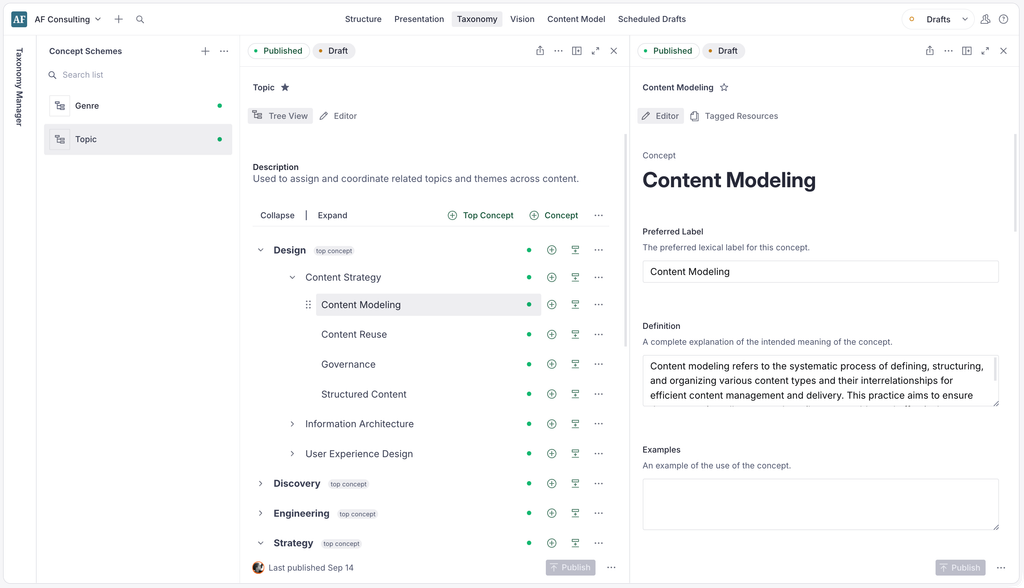
This update was built with accessibility in mind from the start: the mouse-based interaction is an enhancement of functionality you'll find in the overflow menu for each concept, which offers full support for keyboard and screen reader users.
These features also support you freewheeling polyhierarchy enthusiasts out there. Concepts that appear in multiple places in the same hierarchy can be moved independently of each other, and when the concept is open you'll see a highlight on both instances (or more ... though good luck with that!)